سورس کد ماشین حساب مهندسی با html، css و javascript
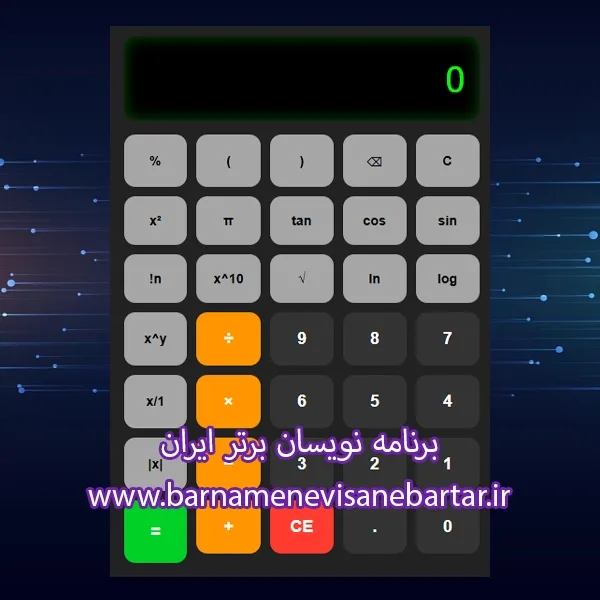
سورس کد ماشین حساب مهندسی
<!DOCTYPE html>
<html lang="fa" dir="rtl">
<head>
<meta charset="UTF-8">
<meta name="viewport" content="width=device-width, initial-scale=1.0">
<title>ماشین حساب مهندسی - اصلاح شده</title>
<style>
body {
font-family: Tahoma, Arial, sans-serif;
background: linear-gradient(135deg, #1e3c72, #2a5298);
display: flex;
justify-content: center;
align-items: center;
min-height: 100vh;
margin: 0;
}
.calculator {
background: #222;
padding: 20px;
border-radius: 20px;
box-shadow: 0 15px 35px rgba(0,0,0,0.6);
width: 380px;
}
.display {
width: 100%;
height: 90px;
background: #000;
color: #0f0;
font-size: 2.4em;
text-align: right;
padding: 0 15px;
border-radius: 12px;
margin-bottom: 15px;
overflow: hidden;
line-height: 90px;
box-shadow: inset 0 0 15px rgba(0,255,0,0.3);
white-space: nowrap;
direction: ltr;
box-sizing: border-box;
}
.buttons {
display: grid;
grid-template-columns: repeat(5, 1fr);
gap: 10px;
}
button {
padding: 18px;
font-size: 1.1em;
border: none;
border-radius: 12px;
cursor: pointer;
transition: all 0.2s;
font-weight: bold;
}
button:hover { transform: scale(1.05); opacity: 0.9; }
.num, .decimal { background: #333; color: white; }
.operator { background: #ff9500; color: white; }
.func { background: #a6a6a6; color: black; font-size: 0.9em; }
.equal { background: #00d026; color: white; grid-row: span 2; }
.clear, .backspace { background: #ff3b30; color: white; }
</style>
</head>
<body>
<div class="calculator">
<div class="display" id="display">0</div>
<div class="buttons">
<button class="func" onclick="clearAll()">C</button>
<button class="func" onclick="backspace()">⌫</button>
<button class="func" onclick="append('(')">(</button>
<button class="func" onclick="append(')')">)</button>
<button class="func" onclick="append('%')">%</button>
<button class="func" onclick="trig('sin')">sin</button>
<button class="func" onclick="trig('cos')">cos</button>
<button class="func" onclick="trig('tan')">tan</button>
<button class="func" onclick="append('Math.PI')">π</button>
<button class="func" onclick="append('**2')">x²</button>
<button class="func" onclick="append('Math.log10(')">log</button>
<button class="func" onclick="append('Math.log(')">ln</button>
<button class="func" onclick="append('Math.sqrt(')">√</button>
<button class="func" onclick="append('Math.pow(10,')">10^x</button>
<button class="func" onclick="append('!')">n!</button>
<button class="num" onclick="append('7')">7</button>
<button class="num" onclick="append('8')">8</button>
<button class="num" onclick="append('9')">9</button>
<button class="operator" onclick="append('/')">÷</button>
<button class="func" onclick="append('Math.pow(')">x^y</button>
<button class="num" onclick="append('4')">4</button>
<button class="num" onclick="append('5')">5</button>
<button class="num" onclick="append('6')">6</button>
<button class="operator" onclick="append('*')">×</button>
<button class="func" onclick="append('1/')">1/x</button>
<button class="num" onclick="append('1')">1</button>
<button class="num" onclick="append('2')">2</button>
<button class="num" onclick="append('3')">3</button>
<button class="operator" onclick="append('-')">−</button>
<button class="func" onclick="append('Math.abs(')">|x|</button>
<button class="num" onclick="append('0')">0</button>
<button class="decimal" onclick="append('.')">.</button>
<button class="clear" onclick="clearDisplay()">CE</button>
<button class="operator" onclick="append('+')">+</button>
<button class="equal" onclick="calculate()">=</button>
</div>
</div>
<script>
const display = document.getElementById('display');
let currentInput = '0';
let shouldReset = false;
function append(value) {
if (shouldReset) {
currentInput = '';
shouldReset = false;
}
if (currentInput === '0' && value !== '.') {
currentInput = value;
} else {
currentInput += value;
}
updateDisplay();
}
function updateDisplay() {
let text = currentInput || '0';
// اگر خیلی طولانی شد، فونت کوچکتر و نمایش علمی
if (text.length > 15) {
display.style.fontSize = '1.4em';
try {
let num = parseFloat(text);
if (!isNaN(num)) {
text = num.toExponential(8);
}
} catch {}
} else if (text.length > 10) {
display.style.fontSize = '1.8em';
} else {
display.style.fontSize = '2.4em';
}
display.textContent = text;
}
function clearAll() {
currentInput = '0';
updateDisplay();
}
function clearDisplay() {
currentInput = '0';
updateDisplay();
}
function backspace() {
if (currentInput.length > 1) {
currentInput = currentInput.slice(0, -1);
} else {
currentInput = '0';
}
updateDisplay();
}
function trig(func) {
let val = eval(currentInput) || 0;
let rad = val * Math.PI / 180;
currentInput = Math[func](rad).toFixed(10).replace(/\.?0+$/, '');
updateDisplay();
}
function factorial(n) {
if (n < 0) return 'خطا';
if (n === 0 || n === 1) return 1;
let res = 1;
for (let i = 2; i <= n; i++) res *= i;
return res;
}
function calculate() {
try {
let expr = currentInput
.replace(/!/g, 'factorial')
.replace(/π/g, 'Math.PI')
.replace(/\^/g, '**');
let result = eval(expr);
if (result === Infinity || result === -Infinity) throw 'خطا';
currentInput = parseFloat(result.toFixed(10)).toString();
} catch (e) {
currentInput = 'خطا';
}
shouldReset = true;
updateDisplay();
}
document.addEventListener('keydown', e => {
if (e.key >= '0' && e.key <= '9') append(e.key);
if (e.key === '.') append('.');
if ('+-*/'.includes(e.key)) append(e.key);
if (e.key === 'Enter' || e.key === '=') calculate();
if (e.key === 'Backspace') backspace();
if (e.key === 'Escape') clearAll();
});
</script>
</body>
</html>